Appearance
Payment initiation
This endpoint is used for initiating payments. It accepts a payload with various parameters for payment configuration.
Endpoint POST
http
/api/paymentHeaders
http
'Content-Type: application/json'
'Authorization: Bearer {access-token}'
Body parameter
json
{
  "merchant_id": "xxxxxxxxxxxxxx",
  "currency": "EUR",
  "amount": 970,
  "label": "ChristmasGifts",
  "shop_name": "Merchant Shop Name Title",
  "order_ref": "42837M",
  "success_url": "https://myshop.com/checkout/payment-success",
  "pending_bank_confirmation_url": "https://myshop.com/checkout/payment-pending",
  "decline_url": "https://myshop.com/checkout/payment-decline",
  "customer_email": "admin@example.org",
  "customer_phone_number": "+1 647-244-2736",
  "customer_billing_info": {
    "customer_birth_date": "01-01-1991",
    "customer_gender": "MALE",
    "customer_first_name": "John",
    "customer_last_name": "Doe",
    "customer_street_address": "24 rue de la paix",
    "customer_city": "Paris",
    "customer_postcode": "26800",
    "customer_country_alpha_2": "FR",
    "customer_region_alpha_2": "PR",
    "customer_ip_address": "192.168.1.1"
  },
  "webhook_url": "https://store1.merchant.com/huch/webhook"
}
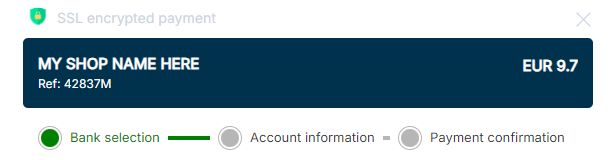
You can use the shop_name parameter to display your shop name on the payment page.
webhook_url (optional)
Custom webhook endpoint for this specific transaction.
- Type:
string(URL) - Required:
false - Constraints: must be a valid HTTPS URL
Behavior
- If
webhook_urlis provided → webhook notifications are sent to this URL. - If not provided → webhook notifications are sent to the merchant-level configured webhook URL.
⚠️ The
webhook_urlmust be publicly accessible and support HTTPS.
HTTP Code sample + TryItOut
1curl --location --request POST 'https://api-gateway-sandbox.huch.tech/api/payment/' \
2--header 'Content-Type: application/json' \
3--header 'Authorization: Bearer ' \
4--data-raw '{
5  "merchant_id": "",
6  "currency": "EUR",
7  "amount": 970,
8  "label": "ChristmasGifts",
9  "shop_name": "Merchant Shop Name Title",
10  "order_ref": "42837M",
11  "success_url": "https://myshop.com/checkout/payment-success",
12  "pending_bank_confirmation_url": "https://myshop.com/checkout/payment-pending",
13  "decline_url": "https://myshop.com/checkout/payment-decline",
14  "customer_email": "admin@example.org",
15  "customer_phone_number": "+1 647-244-2736",
16  "customer_billing_info": {
17    "customer_birth_date": "01-01-1991",
18    "customer_gender": "MALE",
19    "customer_first_name": "John",
20    "customer_last_name": "Doe",
21    "customer_street_address": "24 rue de la paix",
22    "customer_city": "Paris",
23    "customer_postcode": "26800",
24    "customer_country_alpha_2": "FR",
25    "customer_region_alpha_2": "PR",
26    "customer_ip_address": "192.168.1.1"
27  },
28  "webhook_url": "https://store1.merchant.com/huch/webhook"
29}'Example 200 Response
⚠️ Merchants must rely exclusively on the payment_status field to track the payment lifecycle.
Internal fields such as isoStatus are not intended for integration and should be ignored.
json
{
  "payment_status": "NEW",
  "status_info": "Transaction has just been initiated. No customer action yet.",
  "payment_id": "baebe473-f55b-49cf-aa06-e62b6ca99008",
  "type": "WIRE_TRANSFER",
  "currency": "EUR",
  "amount": 970,
  "label": "ChristmasGifts",
  "merchant_id": "xxxxxxxxxxxxxx",
  "merchant_name": "Huch Test Company",
  "merchant_logo": "",
  "url": "https://sandbox.huch.tech/pay/77c81686-9291-4a0e-9724-29d6a1c651be",
  "is_mobile_platform": null,
  "order_ref": "42837M",
  "environment": "SANDBOX",
  "redirect_url": "https://myshop.com/checkout/payment-pending?payment_id=77c81686-9291-4a0e-9724-29d6a1c651be&paymnt_status=NEW",
  "bank_id": null,
  "qr_code": ""
}
After a payment is initiated
- Use the
urlyou received in the response to redirect the user to the Hosted Payment Page (HPP) to complete the payment process. - After the payment is completed, the user will be redirected to one of the following URLs depending on the payment status:
success_url: If the payment is successfully completeddecline_url: If the payment is declined or failedpending_bank_confirmation_url: If the payment is pending bank confirmation
Schemas
For detailed information about the request and response schemas, please refer to our Schemas documentation.
Errors
| Error code | Meaning |
|---|---|
| 400 | Invalid or missing information |
| 403 | Action not allowed |
| 404 | Payment not found |
| 500 | Temporary service issue |
See the Errors & Error Codes page for the shared error format, the X-Request-ID correlation header, and retry guidance.