Appearance
Schemas
PaymentCreationRequest
Properties
| Name | Type | Required | Restrictions | Description |
|---|---|---|---|---|
| currency | string | true | none | Transaction currency (3 letter ISO 4217 code), e.g. EUR. Accepted values: EUR, BGN, CZK, DKK, HUF, ISK, CHF, NOK, PLN, RON, SEK, GBP. |
| amount | integer | true | none | Transaction amount in cents |
| label | string | false | none | Purchase description (optional but recommended). This value is used as the bank reference, so it is good to have it. Characters other than letters, digits and spaces are replaced with spaces. If null, order_ref is used; failing that shop_name, then your registered company name. |
| order_ref | string | false | none | The reference or ID of the transaction on the merchant part, can be used to identify which transaction is associated with Huch transaction. |
| shop_name | string | false | none | Overrides the merchant name displayed on the Hosted Payment Page. Useful if you operate several brands under one account. |
| website_url | string | false | must be a valid URL | The URL of the shop the payment originates from. |
| payment_ttl | integer | false | between 1800 and 604800 | Validity duration of the payment in seconds. Example: 1800 → 30 minutes 604800 → 7 days (default) Min Value: 1800 (30 minutes) Max Value: 604800 (7 days) Once elapsed the payment moves to EXPIRED. |
| merchant_id | string | false | none | Derived from the credentials used to obtain your access token. Any value sent in the body is ignored and replaced with the merchant that owns the token. |
| success_url | string | false | none | URL where the user is sent when the payment is successfully completed. Not enforced by the API, but required in practice — without it the customer has nowhere to return to. (success_url, decline_url and pending_bank_confirmation_url can be the same) |
| pending_bank_confirmation_url | string | false | none | URL where the user is sent after completing the payment while pending bank confirmation. Not enforced by the API, but required in practice. (success_url, decline_url and pending_bank_confirmation_url can be the same) |
| decline_url | string | false | none | URL where the user is sent if the payment is declined or failed. Not enforced by the API, but required in practice. (success_url, decline_url and pending_bank_confirmation_url can be the same) |
| redirect_url deprecated | string | false | none | URL where the user will be sent after completing the payment. |
| allow_bank_change | boolean | false | none | Whether the customer may pick their bank on the Hosted Payment Page. Defaults to true. Send false to pre-select the bank yourself — bank_id and bank_country_code then become required. See Ignore bank selection. |
| bank_id | string | false | required when allow_bank_change is false | Bank identifier code (e.g. revolut_eu). |
| bank_country_code | string | false | required when allow_bank_change is false max 2 characters | Two-letter ISO 3166-1 alpha-2 country code for the bank (e.g. DE). |
| customer_iban | string | false | min 16 characters | Customer IBAN, used to detect their bank (e.g. DE89370400440532013000). |
| payee_iban_id | string | false | must be an IBAN registered to your account | Directs settlement to one of your own registered IBANs instead of your primary one. Rejected with "Unauthorized IBAN specified." if the IBAN does not belong to your merchant account. |
| webhook_url | string | false | must be a valid HTTPS URL | Optional per-transaction webhook endpoint. If provided, webhook events are sent to this URL; otherwise, the merchant-level configured webhook URL is used. |
| customer_email | string | false | none | An email address, to help identify the customer. Example: email@email.com. Recommended — it improves the customer experience by reducing the number of screens shown on later transactions. |
| customer_phone_number | string | false | none | Phone number of the customer |
| customer_billing_info | object | false | none | Customer billing information |
| customer_billing_info.customer_birth_date | string | false | none | Date of birth of the customer (DD-MM-YYYY format) |
| customer_billing_info.customer_gender | string | false | MALE, FEMALE or OTHER | Gender of the customer. Must be upper-case — male is rejected. |
| customer_billing_info.customer_first_name | string | false | none | First name of the customer |
| customer_billing_info.customer_last_name | string | false | none | Last name of the customer |
| customer_billing_info.customer_street_address | string | false | none | Street address of the customer (ex: 8 Rue de Paris) |
| customer_billing_info.customer_city | string | false | none | City of the customer (ex: Paris) |
| customer_billing_info.customer_postcode | string | false | none | Postal code of the customer (ex: 75001) |
| customer_billing_info.customer_country_alpha_2 | string | false | max 2 characters | Iso code "3166-1 alpha-2" (ex: FR) |
| customer_billing_info.customer_region_alpha_2 | string | false | max 2 characters | Iso code "3166-1 alpha-2" (ex: GF) |
| customer_billing_info.customer_ip_address | string | false | none | IP address of the customer (ex: 192.168.1.1) |
Example responses
json
{
  "currency": "EUR",
  "amount": 100,
  "label": "AnotherTest",
  "success_url": "https://myshop.com/checkout/success",
  "pending_bank_confirmation_url": "https://myshop.com/checkout/pending",
  "decline_url": "https://myshop.com/checkout/declined",
  "order_ref": "42837M",
  "customer_email": "customer@example.com",
  "customer_phone_number": "+1234567890",
  "customer_billing_info": {
    "customer_birth_date": "1990-01-01",
    "customer_gender": "MALE",
    "customer_country_alpha_2": "US",
    "customer_region_alpha_2": "CA",
    "customer_city": "Los Angeles",
    "customer_street_address": "123 Main St",
    "customer_postcode": "90001",
    "customer_first_name": "John",
    "customer_last_name": "Doe",
    "customer_ip_address": "192.168.1.1"
  },
  "webhook_url": "https://store1.merchant.com/huch/webhook"
}
Payment
Properties
| Name | Type | Restrictions | Description |
|---|---|---|---|
| payment_id | string | none | Payment ID |
| payment_status | string | none | Payment status |
| status_info | string | none | Explanation about the current status of the payment |
| currency | string | none | Payment currency |
| amount | integer | none | Payment amount in cents |
| url | string | none | Payment URL |
| status deprecated | string | none | Old payment status. Deprecated, use payment_status |
| qr_code deprecated | string | none | QR code as SVG string. Deprecated, use url |
Example responses
json
{
 "payment_status": "NEW",
  "status_info": "Transaction has just been initiated. No customer action yet.",
  "payment_id": "baebe473-f55b-49cf-aa06-e62b6ca99008",
  "type": "WIRE_TRANSFER",
  "status": "PENDING",
  "isoStatus": null,
  "currency": "EUR",
  "amount": 100,
  "label": "TestTransaction",
  "merchant_id": "9abc92d0-49b5-4727-9a8e-86930ca42a7f",
  "merchant_name": "Test Merchant",
  "url": "https://sandbox.huch.tech/pay/baebe473-f55b-49cf-aa06-e62b6ca99008",
  "is_mobile_platform": null,
  "order_ref": "42837M",
  "environment": "SANDBOX",
  "redirect_url": "https://myshop.com/checkout/payment-pending?payment_id=baebe473-f55b-49cf-aa06-e62b6ca99008"
}
PaymentStatus
Enumerated Values
| Name | Type | Required | Restrictions | Description |
|---|---|---|---|---|
| anonymous | string | false | none | Payment status |
| Property | Value | Description (status_info) | Is it a final status? |
|---|---|---|---|
| anonymous | NEW | Payment has just been initiated. No customer action yet. | No |
| anonymous | PENDING | Payment ongoing. Waiting for customer to complete payment. | No |
| anonymous | BANK_CONNECTION_FAILED | BANK CONNECTION FAILED: Unable to contact the bank. You can still retry with another bank. | No |
| anonymous | AWAITING_CONFIRMATION | Awaiting bank verification or customer action on the bank side. | No |
| anonymous | PROCESSING | Payment is being processed by the bank. Settlement has not been done yet. Be aware that it can be REJECTED. | No |
| anonymous | FORCE_PAID | Payment has been manually marked as accepted. | Yes |
| anonymous | PAID | Payment has been accepted by the bank and funds transfer is ongoing. In rare cases, banks can block these transfers for AML issues. | Yes |
| anonymous | PAID_RECEIVED | Payment has been accepted by the bank and received into your bank account. | Yes |
| anonymous | EXPIRED | Customer did not complete the payment before the payment validity period elapsed. | Yes |
| anonymous | CANCELLED | Customer abandoned the payment. | No |
| anonymous | FAILED | Cancelled or rejected by the bank. | Yes |
| anonymous | AUTH_FAILED | Error on authentication with the bank. | Yes |
| anonymous | EXECUTE_FAILED | Bank error while executing the payment. | Yes |
Example responses
json
{
 "payment_status": "NEW",
  "status_info": "Transaction has just been initiated. No customer action yet.",
  "payment_id": "baebe473-f55b-49cf-aa06-e62b6ca99008",
  "type": "WIRE_TRANSFER",
  "status": "PENDING",
  "isoStatus": null,
  "currency": "EUR",
  "amount": 100,
  "label": "TestTransaction",
  "merchant_id": "9abc92d0-49b5-4727-9a8e-86930ca42a7f",
  "merchant_name": "Test Merchant",
  "url": "https://sandbox.huch.tech/pay/baebe473-f55b-49cf-aa06-e62b6ca99008",
  "is_mobile_platform": null,
  "order_ref": "42837M",
  "environment": "SANDBOX",
  "redirect_url": "https://myshop.com/checkout/payment-pending?payment_id=baebe473-f55b-49cf-aa06-e62b6ca99008"
}
CreateUpdateEventSubscription
Properties
| Name | Type | Required | Restrictions | Description |
|---|---|---|---|---|
| url | string | true | none | Notification URL |
Example responses
json
{
  "url": "https://example.com/endpoint"
}
EventSubscriptionResponse
Properties
| Name | Type | Required | Restrictions | Description |
|---|---|---|---|---|
| event_subscription_id | string | false | none | Event subscription identifier |
| merchant_id | string | false | none | Merchant identifier |
| event_type | string | false | none | Event type |
| url | string | false | none | URL |
Example responses
json
{
  "event_subscription_id": "c45d2660-91e4-4166-ab76-f37f89fdb81e",
  "merchant_id": "c45d2660-91e4-4166-ab76-f37f89fdb81e",
  "event_type": "payment.status.changed",
  "url": "https://example.com/endpoint"
}
Wallet Top-Up Strategy:
In specific industries like iGaming, merchants may opt to top up customers' wallets upon receiving PROCESSING status. Customers can use these funds to play, but withdrawals are restricted until PAID (after verification of funds) or PAID_RECEIVED status is confirmed. This approach balances customer experience with financial security considerations.
Additional parameters
Force country selection
You can choose a country by default by adding country parameter to the payment URL
Default example URL: "url":
http
"https://pay.huchpay.com/pay/9f63887f-a2cc-48c5-acca-b5cc6474944c"Example URL for select France (iso code: FR) "url":
http
"https://pay.huchpay.com/pay/9f63887f-a2cc-48c5-acca-b5cc6474944c?country=FR"Example URL to select Germany (iso code DE) "url":
http
"https://pay.huchpay.com/pay/9f63887f-a2cc-48c5-acca-b5cc6474944c?country=DE"Change displayed merchant name
If you have many brands, you can display a different displayed merchant name for each transaction.
You should just add the shop_name parameter to your payload on "Create payment" request.
Here is a payload example to display “Amazon” as a merchant name.
Body parameter
json
{
  "currency": "EUR",
  "amount": 100,
  "label": "AnotherTest",
  "shop_name": "Amazon",
  "success_url": "https://myshop.com/checkout/success",
  "pending_bank_confirmation_url": "https://myshop.com/checkout/pending",
  "decline_url": "https://myshop.com/checkout/declined",
  "order_ref": "42837M",
  "customer_email": "customer@example.com",
  "customer_phone_number": "+1234567890",
  "customer_billing_info": {
    "customer_birth_date": "1990-01-01",
    "customer_gender": "MALE",
    "customer_country_alpha_2": "US",
    "customer_region_alpha_2": "CA",
    "customer_city": "Los Angeles",
    "customer_street_address": "123 Main St",
    "customer_postcode": "90001",
    "customer_first_name": "John",
    "customer_last_name": "Doe",
    "customer_ip_address": "192.168.1.1"
  },
  "webhook_url": "https://store1.merchant.com/huch/webhook"
}
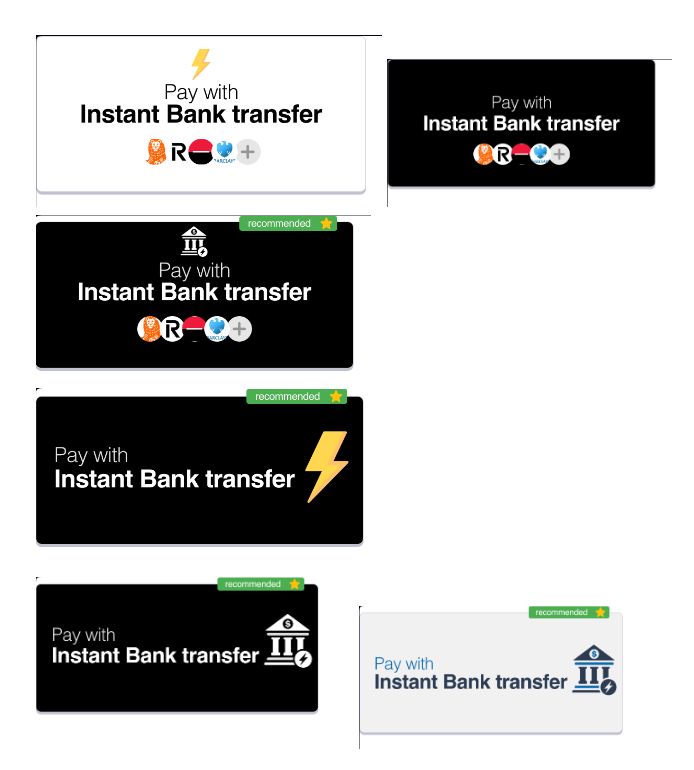
Payment buttons
A good payment button can create reinsurance and incite customers. We have a panel of available payment buttons in SVG available for use. Feel free to ask your account manager.